Monitor and manage system health, performance, and user activities with the Sys Admin Dashboard.
Zylon comes with a built-in Kubernetes Dashboard,
which will help you monitor and diagnose issues with your installation.To enable it, you will need to edit your config file at /etc/zylon/zylon-conf.yaml and add the following section:
adminDashboard:
  enabled: true
  exposeIngress: true
Next, update your Zylon system by running:
sudo zylon-cli sync
Once the update completes, access the dashboard at:
https://<zylon.company.com>/kube-dashboardTo login, you can generate a short-lived token:
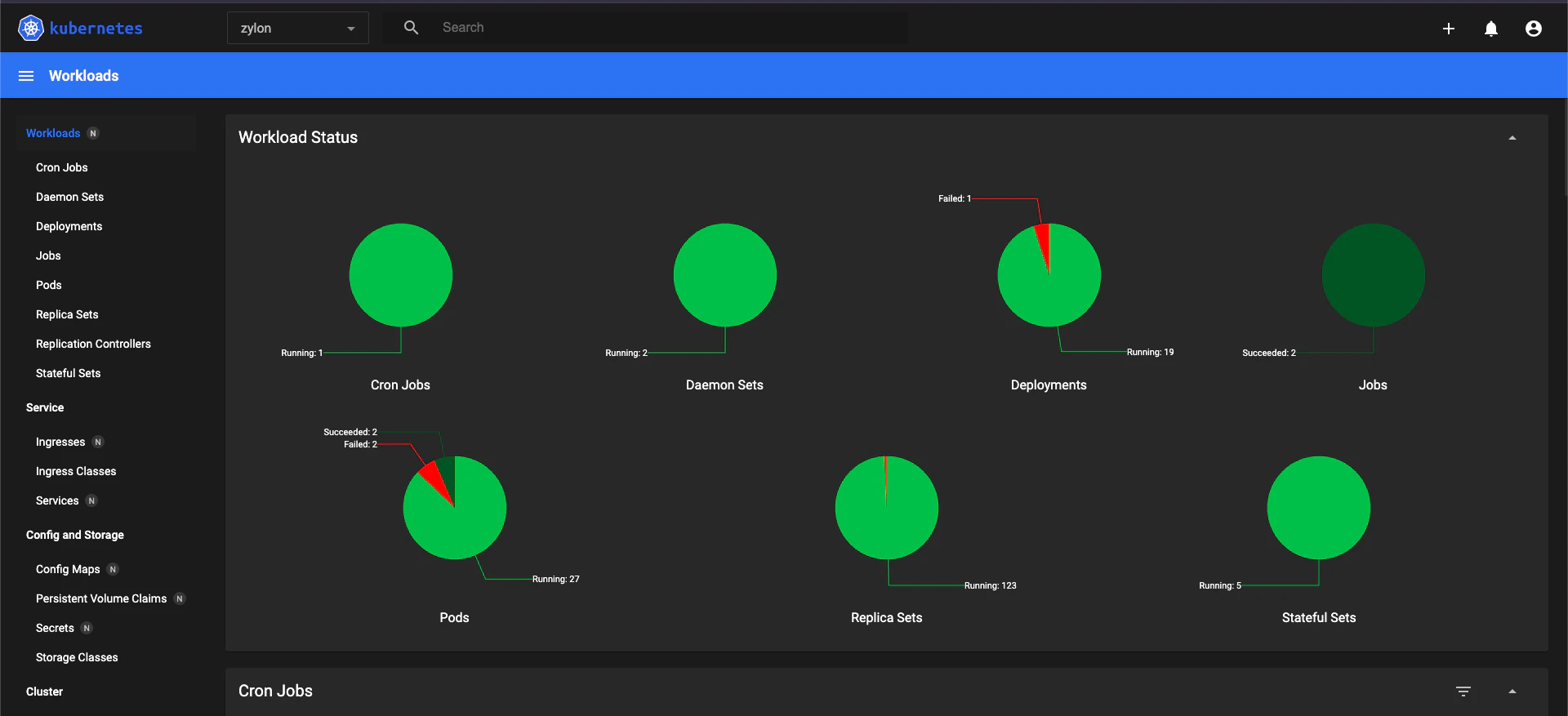
When you first open the Kubernetes Dashboard, you’ll see a high-level overview of your workloads and cluster health.
This view shows the current status of running resources such as Pods, Deployments, and basic CPU/memory usage.
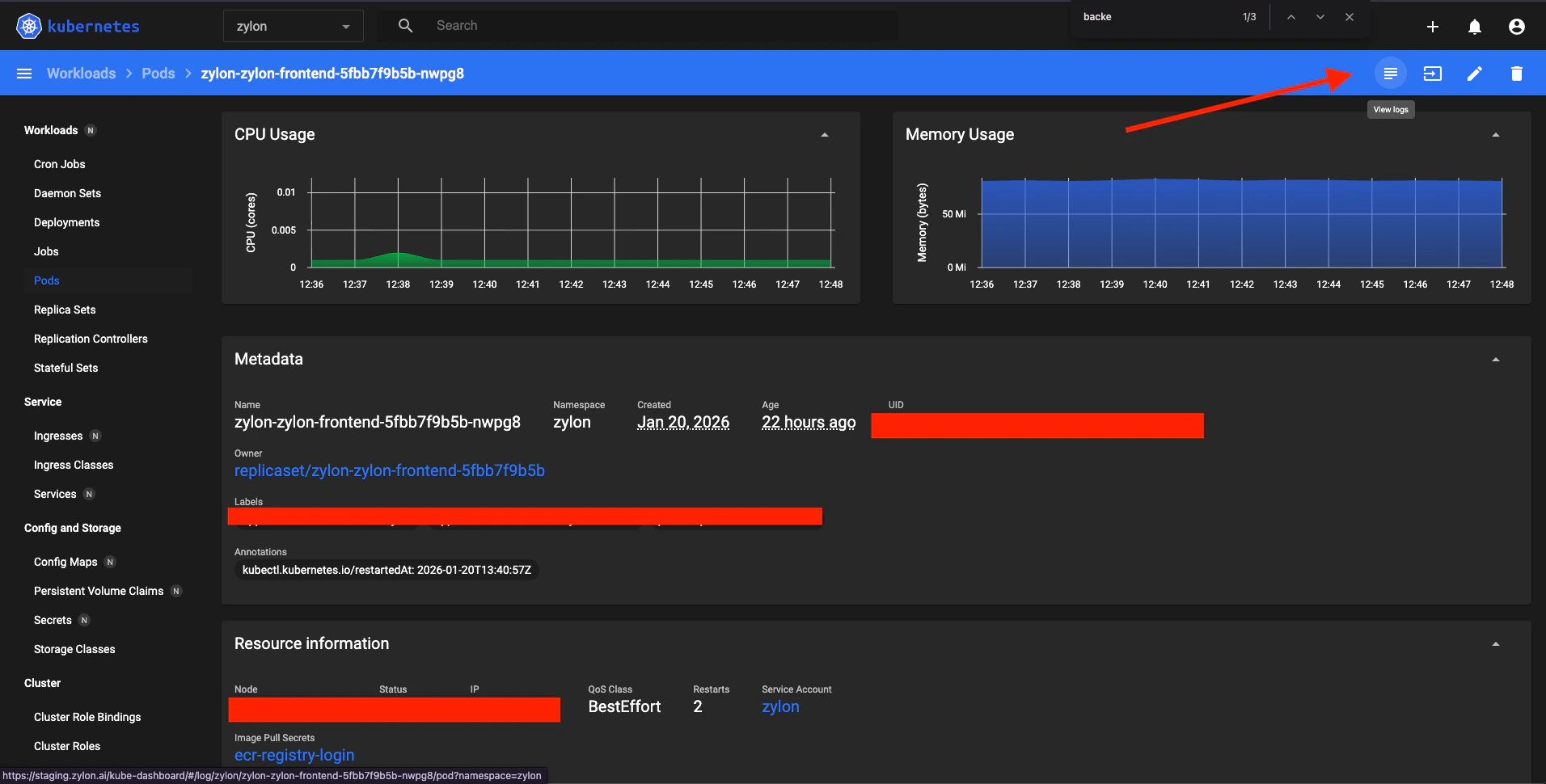
Download logs for offline analysis if your instance is airgap
Logs are usually the fastest way to identify configuration errors, startup failures, or runtime issues.
{"docsConfig":{"theme":"palm","$schema":"https://mintlify.com/docs.json","name":"Zylon","description":"Zylon is an enterprise AI platform delivering private generative AI and on-premise AI software for regulated industries, enabling secure deployment inside enterprise infrastructure without external cloud dependencies.","colors":{"primary":"#796ABF","light":"#796ABF","dark":"#E7E5E4"},"logo":{"light":"https://mintcdn.com/zylon/gak9PYoO0ozUIC1W/logo/light.svg?fit=max\u0026auto=format\u0026n=gak9PYoO0ozUIC1W\u0026q=85\u0026s=138e7b0b2d91e5562def19bf93ef93ef","dark":"https://mintcdn.com/zylon/gak9PYoO0ozUIC1W/logo/dark.svg?fit=max\u0026auto=format\u0026n=gak9PYoO0ozUIC1W\u0026q=85\u0026s=54b0904a089ec64c29a0f16d16da0cc3"},"favicon":"https://mintcdn.com/zylon/_j0w7hJa3Cg0VgjU/favicon.png?fit=max\u0026auto=format\u0026n=_j0w7hJa3Cg0VgjU\u0026q=85\u0026s=8d03180cb6eda69a1f2e0f44bcf63bae","api":{"playground":{"display":"simple"},"examples":{"defaults":"required","languages":["curl","python","javascript"]}},"appearance":{"default":"light"},"background":{"decoration":"gradient","color":{"light":"#FFFFFF","dark":"#1C1917"}},"navbar":{"links":[{"href":"mailto:dev@zylon.ai","label":"Support"}],"primary":{"type":"button","label":"Request a Demo","href":"https://cal.com/zylon/demo?source=docs"}},"footer":{"socials":{"x":"https://x.com/zylonprivategpt","github":"https://github.com/zylon-ai","linkedin":"https://www.linkedin.com/company/zylon-privategpt"}},"styling":{"eyebrows":"breadcrumbs","latex":true},"errors":{"404":{"redirect":false}},"contextual":{"options":["copy"],"display":"header"},"navigation":{"pages":[]}},"deployment":{"deploymentMetadataValue":{"subdomain":"zylon","hasAudioNarration":false,"actualSubdomain":"zylon","customDomains":["docs.zylon.ai"],"gitSource":{"type":"github","owner":"zylon-ai","repo":"zylon-docs","deployBranch":"main","contentDirectory":"","isPrivate":true,"mountPath":"","label":""},"entitlements":{},"buildId":"6af2e8e25b327c2363d1edc3","clientVersion":"0.0.4102","searchFilterCounts":[{"language":"en","tag":"Zylon","count":316},{"language":"es","tag":"Zylon","count":312},{"language":"en","tag":"Operator Manual","count":137},{"language":"es","tag":"Manual del Operador","count":137},{"language":"en","tag":"User Manual","count":95},{"language":"es","tag":"Manual de Usuario","count":93},{"language":"en","tag":"Configuration","count":81},{"language":"es","tag":"Configuración","count":81},{"language":"en","tag":"Developer Manual","count":78},{"language":"es","tag":"Manual de Desarrollador","count":76},{"language":"en","tag":"Build with Zylon","count":66},{"language":"es","tag":"Construye con Zylon","count":64},{"language":"en","tag":"Workspace API","count":37},{"language":"es","tag":"Workspace API","count":37},{"language":"en","tag":"ZylonGPT API","count":25},{"language":"es","tag":"ZylonGPT API","count":25},{"language":"en","tag":"Features \u0026 Capabilities","count":24},{"language":"es","tag":"Funciones y Capacidades","count":24},{"language":"en","tag":"Chat Assistant","count":21},{"language":"es","tag":"Asistente de Chat","count":21}]},"assistantConfig":{},"basePath":"","hasChatPermissions":false,"hasWebMcpPermissions":false,"toggles":[{"name":"kill-isr","enabled":true,"variant":{"name":"disabled","enabled":false,"feature_enabled":true},"impressionData":false},{"name":"custom-rbac-roles","enabled":true,"variant":{"name":"disabled","enabled":false,"feature_enabled":true},"impressionData":false},{"name":"agent-mintlify-slack","enabled":true,"variant":{"name":"disabled","enabled":false,"feature_enabled":true},"impressionData":false},{"name":"agent-integrations-settings","enabled":true,"variant":{"name":"disabled","enabled":false,"feature_enabled":true},"impressionData":false},{"name":"rbac-expansion","enabled":true,"variant":{"name":"disabled","enabled":false,"feature_enabled":true},"impressionData":false},{"name":"automations-pr-grouping","enabled":true,"variant":{"name":"disabled","enabled":false,"feature_enabled":true},"impressionData":false},{"name":"custom-prefix","enabled":true,"variant":{"name":"disabled","enabled":false,"feature_enabled":true},"impressionData":false},{"name":"analytics-v7","enabled":true,"variant":{"name":"disabled","enabled":false,"feature_enabled":true},"impressionData":false},{"name":"user-flows-analytics","enabled":true,"variant":{"name":"disabled","enabled":false,"feature_enabled":true},"impressionData":false},{"name":"no-publish-flow","enabled":true,"variant":{"name":"disabled","enabled":false,"feature_enabled":true},"impressionData":false},{"name":"workos-onboarding","enabled":true,"variant":{"name":"disabled","enabled":false,"feature_enabled":true},"impressionData":false},{"name":"llms-txt-v2","enabled":true,"variant":{"name":"disabled","enabled":false,"feature_enabled":true},"impressionData":false},{"name":"snapshot-serving-live","enabled":true,"variant":{"name":"disabled","enabled":false,"feature_enabled":true},"impressionData":false},{"name":"stripTemperatureMiddleware","enabled":true,"variant":{"name":"disabled","enabled":false,"feature_enabled":true},"impressionData":false},{"name":"support-platform-pylon-zendesk","enabled":true,"variant":{"name":"disabled","enabled":false,"feature_enabled":true},"impressionData":false},{"name":"snapshot-serving","enabled":true,"variant":{"name":"disabled","enabled":false,"feature_enabled":true},"impressionData":false},{"name":"instant-rollback","enabled":true,"variant":{"name":"disabled","enabled":false,"feature_enabled":true},"impressionData":false},{"name":"granular-notifications-server","enabled":true,"variant":{"name":"disabled","enabled":false,"feature_enabled":true},"impressionData":false},{"name":"granular-notifications","enabled":true,"variant":{"name":"disabled","enabled":false,"feature_enabled":true},"impressionData":false},{"name":"automations-fable","enabled":true,"variant":{"name":"disabled","enabled":false,"feature_enabled":true},"impressionData":false},{"name":"fixed-ai-action-pricing","enabled":true,"variant":{"name":"disabled","enabled":false,"feature_enabled":true},"impressionData":false},{"name":"automation-resolve-merge-conflict","enabled":true,"variant":{"name":"disabled","enabled":false,"feature_enabled":true},"impressionData":false},{"name":"scoped-publishing","enabled":true,"variant":{"name":"disabled","enabled":false,"feature_enabled":true},"impressionData":false},{"name":"mintql","enabled":true,"variant":{"name":"disabled","enabled":false,"feature_enabled":true},"impressionData":false},{"name":"page-level-analytics","enabled":true,"variant":{"name":"disabled","enabled":false,"feature_enabled":true},"impressionData":false},{"name":"editor-version-history-v2","enabled":true,"variant":{"name":"disabled","enabled":false,"feature_enabled":true},"impressionData":false},{"name":"billing-page-v2","enabled":true,"variant":{"name":"disabled","enabled":false,"feature_enabled":true},"impressionData":false},{"name":"full-page-search","enabled":true,"variant":{"name":"disabled","enabled":false,"feature_enabled":true},"impressionData":false},{"name":"workspace-projects","enabled":true,"variant":{"name":"disabled","enabled":false,"feature_enabled":true},"impressionData":false},{"name":"assistant-v5","enabled":true,"variant":{"name":"disabled","enabled":false,"feature_enabled":true},"impressionData":false},{"name":"fork-pr-previews","enabled":true,"variant":{"name":"disabled","enabled":false,"feature_enabled":true},"impressionData":false},{"name":"revalidation-jwt","enabled":true,"variant":{"name":"disabled","enabled":false,"feature_enabled":true},"impressionData":false},{"name":"workos-sso-scim","enabled":true,"variant":{"name":"disabled","enabled":false,"feature_enabled":true},"impressionData":false},{"name":"hobby-abuse-scan","enabled":true,"variant":{"name":"disabled","enabled":false,"feature_enabled":true},"impressionData":false},{"name":"dashboard-inbox","enabled":true,"variant":{"name":"disabled","enabled":false,"feature_enabled":true},"impressionData":false},{"name":"workos-signup","enabled":true,"variant":{"name":"disabled","enabled":false,"feature_enabled":true},"impressionData":false},{"name":"turbopuffer-dual-write","enabled":true,"variant":{"name":"disabled","enabled":false,"feature_enabled":true},"impressionData":false},{"name":"workos-enabled","enabled":true,"variant":{"name":"disabled","enabled":false,"feature_enabled":true},"impressionData":false},{"name":"approve-review-flow","enabled":true,"variant":{"name":"disabled","enabled":false,"feature_enabled":true},"impressionData":false},{"name":"editor-metadata","enabled":true,"variant":{"name":"disabled","enabled":false,"feature_enabled":true},"impressionData":false},{"name":"sso-setup-deadline-banner","enabled":true,"variant":{"name":"disabled","enabled":false,"feature_enabled":true},"impressionData":false},{"name":"turbopuffer-serve","enabled":true,"variant":{"name":"disabled","enabled":false,"feature_enabled":true},"impressionData":false},{"name":"live-agents","enabled":true,"variant":{"name":"disabled","enabled":false,"feature_enabled":true},"impressionData":false}],"googleFontsInlined":false},"customCss":[{"filePath":"style.css","content":".dark{--zylon-surface: oklch(0.268 0.007 56.043);--zylon-paper: oklch(0.2 0.004 56.043);--zylon-code: oklch(0.18 0.006 56.043);--zylon-text: oklch(0.985 0.001 106.423);--zylon-body: oklch(0.985 0.001 106.423 / 72%);--zylon-muted: oklch(0.709 0.01 56.259);--zylon-border: oklch(1 0 0 / 10%);--primary: var(--primary-dark);--primary-light: var(--primary-dark)}.dark #navbar{background-color:rgb(var(--background-dark))}.dark #sidebar-content,.dark #navbar>div:first-child,.dark #footer{border-color:var(--zylon-border)}.dark span.pointer-events-none[style*=\"radial-gradient\"]{display:none}.dark #page-title,.dark #content :is(h1,h2,h3,h4,strong),.dark .card :is(h2,h3){color:var(--zylon-text)}.dark #content{color:var(--zylon-body);--tw-prose-body: var(--zylon-body);--tw-prose-headings: var(--zylon-text);--tw-prose-bold: var(--zylon-text);--tw-prose-links: var(--zylon-text)}.dark #table-of-contents{color:var(--zylon-muted)}.dark #search-bar-entry{background:var(--zylon-surface);color:var(--zylon-muted);--tw-ring-color: var(--zylon-border)}.dark .card{background:var(--zylon-paper);border-color:var(--zylon-border)}.dark .card p{color:var(--zylon-body)}.dark .card:hover{background:var(--zylon-surface);border-color:oklch(1 0 0 / 20%)}.dark .code-block{background:var(--zylon-code);border-color:var(--zylon-border)}.dark .code-block-background{--shiki-dark-bg: var(--zylon-code) !important}"}],"page":{"pagePath":"en/v1.57/operator-manual/operations/sys-admin-dashboard","slug":"/en/v1.57/operator-manual/operations/sys-admin-dashboard","pageMetadata":{"title":"Sys Admin Dashboard","description":"Monitor and manage system health, performance, and user activities with the Sys Admin Dashboard.","href":"/en/v1.57/operator-manual/operations/sys-admin-dashboard"},"description":{"compiledSource":"\"use strict\";\nconst {jsx: _jsx} = arguments[0];\nconst {useMDXComponents: _provideComponents} = arguments[0];\nfunction _createMdxContent(props) {\n const _components = {\n p: \"p\",\n ..._provideComponents(),\n ...props.components\n };\n return _jsx(_components.p, {\n children: \"Monitor and manage system health, performance, and user activities with the Sys Admin Dashboard.\"\n });\n}\nfunction MDXContent(props = {}) {\n const {wrapper: MDXLayout} = {\n ..._provideComponents(),\n ...props.components\n };\n return MDXLayout ? _jsx(MDXLayout, {\n ...props,\n children: _jsx(_createMdxContent, {\n ...props\n })\n }) : _createMdxContent(props);\n}\nreturn {\n default: MDXContent\n};\n","frontmatter":{},"scope":{}},"pageType":"default","mdx":{"mdxSource":{"compiledSource":"\"use strict\";const{Fragment:_Fragment,jsx:_jsx,jsxs:_jsxs}=arguments[0];const{useMDXComponents:_provideComponents}=arguments[0];function _createMdxContent(props){const _components={a:`a`,code:`code`,hr:`hr`,li:`li`,ol:`ol`,p:`p`,pre:`pre`,span:`span`,strong:`strong`,ul:`ul`,..._provideComponents(),...props.components},{CodeBlock,Heading,OptimizedImage,Tip,Warning}=_components;if(!CodeBlock)_missingMdxReference(`CodeBlock`,true);if(!Heading)_missingMdxReference(`Heading`,true);if(!OptimizedImage)_missingMdxReference(`OptimizedImage`,true);if(!Tip)_missingMdxReference(`Tip`,true);if(!Warning)_missingMdxReference(`Warning`,true);return _jsxs(_Fragment,{children:[_jsxs(_components.p,{children:[`Zylon comes with a built-in `,_jsx(_components.a,{href:`https://kubernetes.io/docs/tasks/access-application-cluster/web-ui-dashboard/`,children:`Kubernetes Dashboard`}),`,\nwhich will help you monitor and diagnose issues with your installation.`]}),`\n`,_jsxs(_components.p,{children:[`To enable it, you will need to edit your config file at `,_jsx(_components.code,{children:`/etc/zylon/zylon-conf.yaml`}),` and add the following section:`]}),`\n`,_jsx(CodeBlock,{filename:``,numberOfLines:`3`,language:`yaml`,children:_jsx(_components.pre,{className:`shiki shiki-themes github-light-default dark-plus`,style:{backgroundColor:`#ffffff`,\"--shiki-dark-bg\":`#0B0C0E`,color:`#1f2328`,\"--shiki-dark\":`#D4D4D4`},language:`yaml`,children:_jsxs(_components.code,{language:`yaml`,numberOfLines:`3`,children:[_jsxs(_components.span,{className:`line`,children:[_jsx(_components.span,{style:{color:`#116329`,\"--shiki-dark\":`#569CD6`},children:`adminDashboard`}),_jsx(_components.span,{style:{color:`#1F2328`,\"--shiki-dark\":`#D4D4D4`},children:`:`})]}),`\n`,_jsxs(_components.span,{className:`line`,children:[_jsx(_components.span,{style:{color:`#116329`,\"--shiki-dark\":`#569CD6`},children:` enabled`}),_jsx(_components.span,{style:{color:`#1F2328`,\"--shiki-dark\":`#D4D4D4`},children:`: `}),_jsx(_components.span,{style:{color:`#0550AE`,\"--shiki-dark\":`#569CD6`},children:`true`})]}),`\n`,_jsxs(_components.span,{className:`line`,children:[_jsx(_components.span,{style:{color:`#116329`,\"--shiki-dark\":`#569CD6`},children:` exposeIngress`}),_jsx(_components.span,{style:{color:`#1F2328`,\"--shiki-dark\":`#D4D4D4`},children:`: `}),_jsx(_components.span,{style:{color:`#0550AE`,\"--shiki-dark\":`#569CD6`},children:`true`})]}),`\n`]})})}),`\n`,_jsx(_components.p,{children:`Next, update your Zylon system by running:`}),`\n`,_jsx(CodeBlock,{filename:``,numberOfLines:`1`,language:`shellscript`,children:_jsx(_components.pre,{className:`shiki shiki-themes github-light-default dark-plus`,style:{backgroundColor:`#ffffff`,\"--shiki-dark-bg\":`#0B0C0E`,color:`#1f2328`,\"--shiki-dark\":`#D4D4D4`},language:`shellscript`,children:_jsxs(_components.code,{language:`shellscript`,numberOfLines:`1`,children:[_jsxs(_components.span,{className:`line`,children:[_jsx(_components.span,{style:{color:`#953800`,\"--shiki-dark\":`#DCDCAA`},children:`sudo`}),_jsx(_components.span,{style:{color:`#0A3069`,\"--shiki-dark\":`#CE9178`},children:` zylon-cli`}),_jsx(_components.span,{style:{color:`#0A3069`,\"--shiki-dark\":`#CE9178`},children:` sync`})]}),`\n`]})})}),`\n`,_jsxs(_components.p,{children:[`Once the update completes, access the dashboard at:\n`,_jsx(_components.code,{children:`https://\u003czylon.company.com>/kube-dashboard`})]}),`\n`,_jsx(_components.p,{children:`To login, you can generate a short-lived token:`}),`\n`,_jsx(CodeBlock,{filename:``,numberOfLines:`1`,language:`shellscript`,children:_jsx(_components.pre,{className:`shiki shiki-themes github-light-default dark-plus`,style:{backgroundColor:`#ffffff`,\"--shiki-dark-bg\":`#0B0C0E`,color:`#1f2328`,\"--shiki-dark\":`#D4D4D4`},language:`shellscript`,children:_jsxs(_components.code,{language:`shellscript`,numberOfLines:`1`,children:[_jsxs(_components.span,{className:`line`,children:[_jsx(_components.span,{style:{color:`#953800`,\"--shiki-dark\":`#DCDCAA`},children:`kubectl`}),_jsx(_components.span,{style:{color:`#0550AE`,\"--shiki-dark\":`#569CD6`},children:` -n`}),_jsx(_components.span,{style:{color:`#0A3069`,\"--shiki-dark\":`#CE9178`},children:` zylon`}),_jsx(_components.span,{style:{color:`#0A3069`,\"--shiki-dark\":`#CE9178`},children:` create`}),_jsx(_components.span,{style:{color:`#0A3069`,\"--shiki-dark\":`#CE9178`},children:` token`}),_jsx(_components.span,{style:{color:`#0A3069`,\"--shiki-dark\":`#CE9178`},children:` zylon`})]}),`\n`]})})}),`\n`,_jsx(_components.p,{children:`Or a permanent token:`}),`\n`,_jsx(CodeBlock,{filename:``,numberOfLines:`1`,language:`shellscript`,children:_jsx(_components.pre,{className:`shiki shiki-themes github-light-default dark-plus`,style:{backgroundColor:`#ffffff`,\"--shiki-dark-bg\":`#0B0C0E`,color:`#1f2328`,\"--shiki-dark\":`#D4D4D4`},language:`shellscript`,children:_jsxs(_components.code,{language:`shellscript`,numberOfLines:`1`,children:[_jsxs(_components.span,{className:`line`,children:[_jsx(_components.span,{style:{color:`#953800`,\"--shiki-dark\":`#DCDCAA`},children:`kubectl`}),_jsx(_components.span,{style:{color:`#0A3069`,\"--shiki-dark\":`#CE9178`},children:` get`}),_jsx(_components.span,{style:{color:`#0A3069`,\"--shiki-dark\":`#CE9178`},children:` secret`}),_jsx(_components.span,{style:{color:`#0A3069`,\"--shiki-dark\":`#CE9178`},children:` zylon-token`}),_jsx(_components.span,{style:{color:`#0550AE`,\"--shiki-dark\":`#569CD6`},children:` -n`}),_jsx(_components.span,{style:{color:`#0A3069`,\"--shiki-dark\":`#CE9178`},children:` zylon`}),_jsx(_components.span,{style:{color:`#0550AE`,\"--shiki-dark\":`#569CD6`},children:` -o`}),_jsx(_components.span,{style:{color:`#0A3069`,\"--shiki-dark\":`#CE9178`},children:` jsonpath='{.data.token}'`}),_jsx(_components.span,{style:{color:`#CF222E`,\"--shiki-dark\":`#D4D4D4`},children:` |`}),_jsx(_components.span,{style:{color:`#953800`,\"--shiki-dark\":`#DCDCAA`},children:` base64`}),_jsx(_components.span,{style:{color:`#0550AE`,\"--shiki-dark\":`#569CD6`},children:` -d`})]}),`\n`]})})}),`\n`,_jsx(Warning,{children:_jsx(_components.p,{children:`The permanent token will provide full admin access to your Kubernetes cluster.\nKeep it secret and secure.`})}),`\n`,_jsxs(Tip,{children:[_jsx(_components.p,{children:`Zylon uses multiple namespaces, you can check the status of each.\nSelect the right namespace from the dropdown on the top left corner.`}),_jsxs(_components.ul,{children:[`\n`,_jsx(_components.li,{children:`zylon: Zylon system components`}),`\n`,_jsx(_components.li,{children:`openebs: OpenEBS storage system`}),`\n`,_jsx(_components.li,{children:`nvidia: NVIDIA controller and device plugin`}),`\n`]})]}),`\n`,_jsx(_components.p,{children:`After logging in, you will be able to see the status of your Zylon installation, including:`}),`\n`,_jsxs(_components.ul,{children:[`\n`,_jsx(_components.li,{children:`Pods`}),`\n`,_jsx(_components.li,{children:`Logs`}),`\n`,_jsx(_components.li,{children:`Basic metrics regarding CPU and memory usage`}),`\n`]}),`\n`,_jsx(Heading,{level:`2`,id:`frequent-questions`,children:`Frequent Questions`}),`\n`,_jsx(_components.p,{children:`This section explains how to navigate the Kubernetes Dashboard to investigate common issues in your Zylon installation.`}),`\n`,_jsx(Heading,{level:`3`,id:`-where-do-i-start-when-something-is-not-working`,children:`❓ Where do I start when something is not working?`}),`\n`,_jsx(_components.p,{children:`When you first open the Kubernetes Dashboard, you’ll see a high-level overview of your workloads and cluster health.\nThis view shows the current status of running resources such as Pods, Deployments, and basic CPU/memory usage.`}),`\n`,_jsx(OptimizedImage,{src:`https://mintcdn.com/zylon/J25J8IDOgVs0UO0R/images/operator-manual/k8s-1.png?fit=max\u0026auto=format\u0026n=J25J8IDOgVs0UO0R\u0026q=85\u0026s=8543483645ef100b8e69e3a81ad4d43f`,alt:`image`,\"data-og-width\":`1920`,width:`1920`,\"data-og-height\":`877`,height:`877`,\"data-path\":`images/operator-manual/k8s-1.png`,\"data-optimize\":`true`,\"data-opv\":`3`,srcset:`https://mintcdn.com/zylon/J25J8IDOgVs0UO0R/images/operator-manual/k8s-1.png?w=280\u0026fit=max\u0026auto=format\u0026n=J25J8IDOgVs0UO0R\u0026q=85\u0026s=5c30a688b6be4f3dba42f6c895027e9e 280w, https://mintcdn.com/zylon/J25J8IDOgVs0UO0R/images/operator-manual/k8s-1.png?w=560\u0026fit=max\u0026auto=format\u0026n=J25J8IDOgVs0UO0R\u0026q=85\u0026s=1a0054f91cb11c3eac3f302fac95bd89 560w, https://mintcdn.com/zylon/J25J8IDOgVs0UO0R/images/operator-manual/k8s-1.png?w=840\u0026fit=max\u0026auto=format\u0026n=J25J8IDOgVs0UO0R\u0026q=85\u0026s=e97de8ec3724fbd2c511f7e3b4e3a4a9 840w, https://mintcdn.com/zylon/J25J8IDOgVs0UO0R/images/operator-manual/k8s-1.png?w=1100\u0026fit=max\u0026auto=format\u0026n=J25J8IDOgVs0UO0R\u0026q=85\u0026s=3e5e8f38e76f150972bf37a2cd3b0214 1100w, https://mintcdn.com/zylon/J25J8IDOgVs0UO0R/images/operator-manual/k8s-1.png?w=1650\u0026fit=max\u0026auto=format\u0026n=J25J8IDOgVs0UO0R\u0026q=85\u0026s=663afcd902c67bd255c8601b0e17aac5 1650w, https://mintcdn.com/zylon/J25J8IDOgVs0UO0R/images/operator-manual/k8s-1.png?w=2500\u0026fit=max\u0026auto=format\u0026n=J25J8IDOgVs0UO0R\u0026q=85\u0026s=cc186b49eca5932c71229d55f6dd1745 2500w`}),`\n`,_jsx(_components.hr,{}),`\n`,_jsx(Heading,{level:`3`,id:`-which-namespace-should-i-select`,children:`❓ Which namespace should I select?`}),`\n`,_jsxs(_components.p,{children:[`Zylon uses multiple namespaces, but most workspace and platform issues will be in the `,_jsx(_components.code,{children:`zylon`}),` namespace.`]}),`\n`,_jsxs(_components.ol,{children:[`\n`,_jsxs(_components.li,{children:[`Open the namespace dropdown in the `,_jsx(_components.strong,{children:`top-left corner`}),` of the dashboard`]}),`\n`,_jsx(_components.li,{children:`Select the namespace you want to check`}),`\n`,_jsx(_components.li,{children:`The dashboard will refresh and show only that namespace’s system components`}),`\n`]}),`\n`,_jsx(_components.p,{children:`This helps reduce noise and ensures you are inspecting the correct resources.`}),`\n`,_jsx(OptimizedImage,{src:`https://mintcdn.com/zylon/J25J8IDOgVs0UO0R/images/operator-manual/k8s-2.png?fit=max\u0026auto=format\u0026n=J25J8IDOgVs0UO0R\u0026q=85\u0026s=be279a6ee4b3e58abc6735327f8c4fa1`,alt:`image`,\"data-og-width\":`1918`,width:`1918`,\"data-og-height\":`479`,height:`479`,\"data-path\":`images/operator-manual/k8s-2.png`,\"data-optimize\":`true`,\"data-opv\":`3`,srcset:`https://mintcdn.com/zylon/J25J8IDOgVs0UO0R/images/operator-manual/k8s-2.png?w=280\u0026fit=max\u0026auto=format\u0026n=J25J8IDOgVs0UO0R\u0026q=85\u0026s=e8277b284e71b2fb580e9ae91be517f8 280w, https://mintcdn.com/zylon/J25J8IDOgVs0UO0R/images/operator-manual/k8s-2.png?w=560\u0026fit=max\u0026auto=format\u0026n=J25J8IDOgVs0UO0R\u0026q=85\u0026s=890b6921cad993c147785f84a2e74612 560w, https://mintcdn.com/zylon/J25J8IDOgVs0UO0R/images/operator-manual/k8s-2.png?w=840\u0026fit=max\u0026auto=format\u0026n=J25J8IDOgVs0UO0R\u0026q=85\u0026s=3ff9433768621d8ecd1b608f15fc5674 840w, https://mintcdn.com/zylon/J25J8IDOgVs0UO0R/images/operator-manual/k8s-2.png?w=1100\u0026fit=max\u0026auto=format\u0026n=J25J8IDOgVs0UO0R\u0026q=85\u0026s=d3d3f9df4c296a98fa45bd01a2dc90d0 1100w, https://mintcdn.com/zylon/J25J8IDOgVs0UO0R/images/operator-manual/k8s-2.png?w=1650\u0026fit=max\u0026auto=format\u0026n=J25J8IDOgVs0UO0R\u0026q=85\u0026s=9c94ae24f16ebb123ca500181881f5e3 1650w, https://mintcdn.com/zylon/J25J8IDOgVs0UO0R/images/operator-manual/k8s-2.png?w=2500\u0026fit=max\u0026auto=format\u0026n=J25J8IDOgVs0UO0R\u0026q=85\u0026s=9ac05a3f835ddd59d8ea2e11f3842375 2500w`}),`\n`,_jsx(_components.hr,{}),`\n`,_jsx(Heading,{level:`3`,id:`-how-do-i-view-logs-for-a-pod`,children:`❓ How do I view logs for a Pod?`}),`\n`,_jsx(_components.p,{children:`To inspect logs for a specific Pod:`}),`\n`,_jsxs(_components.ol,{children:[`\n`,_jsxs(_components.li,{children:[`Click on the `,_jsx(_components.strong,{children:`Pod name`}),` you want to investigate`]}),`\n`,_jsx(_components.li,{children:`This opens the Pod details page with:`}),`\n`]}),`\n`,_jsxs(_components.ul,{children:[`\n`,_jsx(_components.li,{children:`Status`}),`\n`,_jsx(_components.li,{children:`Events`}),`\n`,_jsx(_components.li,{children:`Resource usage`}),`\n`,_jsx(_components.li,{children:`Containers`}),`\n`]}),`\n`,_jsxs(_components.ol,{start:`3`,children:[`\n`,_jsxs(_components.li,{children:[`In the `,_jsx(_components.strong,{children:`top-right corner`}),`, click `,_jsx(_components.strong,{children:`Logs`}),`\n`,_jsx(OptimizedImage,{src:`https://mintcdn.com/zylon/J25J8IDOgVs0UO0R/images/operator-manual/k8s-3.png?fit=max\u0026auto=format\u0026n=J25J8IDOgVs0UO0R\u0026q=85\u0026s=35af643efe3276c2b83cc95a86268766`,alt:`image`,\"data-og-width\":`1912`,width:`1912`,\"data-og-height\":`970`,height:`970`,\"data-path\":`images/operator-manual/k8s-3.png`,\"data-optimize\":`true`,\"data-opv\":`3`,srcset:`https://mintcdn.com/zylon/J25J8IDOgVs0UO0R/images/operator-manual/k8s-3.png?w=280\u0026fit=max\u0026auto=format\u0026n=J25J8IDOgVs0UO0R\u0026q=85\u0026s=944d67d81bf01d5857f1476a6c531fce 280w, https://mintcdn.com/zylon/J25J8IDOgVs0UO0R/images/operator-manual/k8s-3.png?w=560\u0026fit=max\u0026auto=format\u0026n=J25J8IDOgVs0UO0R\u0026q=85\u0026s=835a672fadbe27cddcae43403049ca42 560w, https://mintcdn.com/zylon/J25J8IDOgVs0UO0R/images/operator-manual/k8s-3.png?w=840\u0026fit=max\u0026auto=format\u0026n=J25J8IDOgVs0UO0R\u0026q=85\u0026s=aa7e56db8d2a56a42a2ac867aa1a64d5 840w, https://mintcdn.com/zylon/J25J8IDOgVs0UO0R/images/operator-manual/k8s-3.png?w=1100\u0026fit=max\u0026auto=format\u0026n=J25J8IDOgVs0UO0R\u0026q=85\u0026s=975e3fb4422d6454854cb466b7cfc504 1100w, https://mintcdn.com/zylon/J25J8IDOgVs0UO0R/images/operator-manual/k8s-3.png?w=1650\u0026fit=max\u0026auto=format\u0026n=J25J8IDOgVs0UO0R\u0026q=85\u0026s=41d9295670388a75261b079d7f5958f6 1650w, https://mintcdn.com/zylon/J25J8IDOgVs0UO0R/images/operator-manual/k8s-3.png?w=2500\u0026fit=max\u0026auto=format\u0026n=J25J8IDOgVs0UO0R\u0026q=85\u0026s=b5e33e396add2ffb73b693cfc43e01bb 2500w`}),`\n`,`You can:`]}),`\n`]}),`\n`,_jsxs(_components.ul,{children:[`\n`,_jsx(_components.li,{children:`View live logs`}),`\n`,_jsx(_components.li,{children:`Download logs for offline analysis if your instance is airgap`}),`\n`]}),`\n`,_jsx(_components.p,{children:`Logs are usually the fastest way to identify configuration errors, startup failures, or runtime issues.`})]})}function MDXContent(props={}){const{wrapper:MDXLayout}={..._provideComponents(),...props.components};return MDXLayout?_jsx(MDXLayout,{...props,children:_jsx(_createMdxContent,{...props})}):_createMdxContent(props)}return{default:MDXContent};function _missingMdxReference(id,component){throw new Error(`Expected `+(component?`component`:`object`)+\" `\"+id+\"` to be defined: you likely forgot to import, pass, or provide it.\")}","frontmatter":{},"scope":{"config":{},"pageMetadata":{"title":"Sys Admin Dashboard","description":"Monitor and manage system health, performance, and user activities with the Sys Admin Dashboard.","href":"/en/v1.57/operator-manual/operations/sys-admin-dashboard"}}},"mdxSourceWithNoJs":null},"mdxExtracts":{"tableOfContents":[{"title":"Frequent Questions","slug":"frequent-questions","depth":2,"children":[{"title":"❓ Where do I start when something is not working?","slug":"-where-do-i-start-when-something-is-not-working","depth":3,"children":[]},{"title":"❓ Which namespace should I select?","slug":"-which-namespace-should-i-select","depth":3,"children":[]},{"title":"❓ How do I view logs for a Pod?","slug":"-how-do-i-view-logs-for-a-pod","depth":3,"children":[]}]}],"codeExamples":{}},"jsLinks":[],"subdomain":"zylon","siteName":"Zylon","title":"Sys Admin Dashboard - Zylon","navMaps":{"firstHrefInVersion":{"1.58":{"href":"/en/v1.58/operator-manual/operations/sys-admin-dashboard","matchLevel":1},"1.57":{"href":"/en/v1.57/operator-manual/operations/sys-admin-dashboard","matchLevel":0}},"firstHrefInLanguage":{"es":{"href":"/es/v1.57/operator-manual/operations/sys-admin-dashboard","matchLevel":1},"en":{"href":"/en/v1.57/operator-manual/operations/sys-admin-dashboard","matchLevel":0}}},"lastModified":"2026-10-16T09:45:26.485Z","originalFileLocation":"en/v1.57/operator-manual/operations/sys-admin-dashboard.mdx","locale":"en"},"headHtml":"\u003cscript data-mint-head>(function(){var d=document.documentElement,p=null;if(!p){try{p=localStorage.getItem(\"isDarkMode\")}catch(e){}if(p==='true')p='dark';else if(p==='false')p='light';if(p!=='light'\u0026\u0026p!=='dark'\u0026\u0026p!=='system')p=\"light\"}var r=p==='system'?(matchMedia(\"(prefers-color-scheme: dark)\").matches?'dark':'light'):p;d.classList.remove(r==='dark'?'light':'dark');d.classList.add(r);d.setAttribute(\"data-theme-preference\",p)})();\u003c/script>\u003cmeta data-mint-head name=\"description\" content=\"Monitor and manage system health, performance, and user activities with the Sys Admin Dashboard.\">\u003cmeta data-mint-head name=\"application-name\" content=\"Zylon\">\u003cmeta data-mint-head name=\"generator\" content=\"Mintlify\">\u003clink data-mint-head rel=\"icon\" type=\"image/png\" sizes=\"192x192\" href=\"/mintlify-assets/_mintlify/favicons/zylon/3kb7900r6lLAc1G9/_generated/favicon/android-chrome-192x192.png\" media=\"(prefers-color-scheme: light)\">\u003clink data-mint-head rel=\"apple-touch-icon\" type=\"image/png\" sizes=\"180x180\" href=\"/mintlify-assets/_mintlify/favicons/zylon/3kb7900r6lLAc1G9/_generated/favicon/apple-touch-icon.png\">\u003clink data-mint-head rel=\"icon\" type=\"image/png\" sizes=\"16x16\" href=\"/mintlify-assets/_mintlify/favicons/zylon/3kb7900r6lLAc1G9/_generated/favicon/favicon-16x16.png\" media=\"(prefers-color-scheme: light)\">\u003clink data-mint-head rel=\"icon\" type=\"image/png\" sizes=\"32x32\" href=\"/mintlify-assets/_mintlify/favicons/zylon/3kb7900r6lLAc1G9/_generated/favicon/favicon-32x32.png\" media=\"(prefers-color-scheme: light)\">\u003clink data-mint-head rel=\"shortcut icon\" type=\"image/x-icon\" href=\"/mintlify-assets/_mintlify/favicons/zylon/3kb7900r6lLAc1G9/_generated/favicon/favicon.ico\" media=\"(prefers-color-scheme: light)\">\u003clink data-mint-head rel=\"icon\" type=\"image/png\" sizes=\"192x192\" href=\"/mintlify-assets/_mintlify/favicons/zylon/3kb7900r6lLAc1G9/_generated/favicon-dark/android-chrome-192x192.png\" media=\"(prefers-color-scheme: dark)\">\u003clink data-mint-head rel=\"icon\" type=\"image/png\" sizes=\"16x16\" href=\"/mintlify-assets/_mintlify/favicons/zylon/3kb7900r6lLAc1G9/_generated/favicon-dark/favicon-16x16.png\" media=\"(prefers-color-scheme: dark)\">\u003clink data-mint-head rel=\"icon\" type=\"image/png\" sizes=\"32x32\" href=\"/mintlify-assets/_mintlify/favicons/zylon/3kb7900r6lLAc1G9/_generated/favicon-dark/favicon-32x32.png\" media=\"(prefers-color-scheme: dark)\">\u003clink data-mint-head rel=\"shortcut icon\" type=\"image/x-icon\" href=\"/mintlify-assets/_mintlify/favicons/zylon/3kb7900r6lLAc1G9/_generated/favicon-dark/favicon.ico\" media=\"(prefers-color-scheme: dark)\">\u003cmeta data-mint-head property=\"og:title\" content=\"Sys Admin Dashboard - Zylon\">\u003cmeta data-mint-head property=\"og:description\" content=\"Monitor and manage system health, performance, and user activities with the Sys Admin Dashboard.\">\u003cmeta data-mint-head property=\"og:site_name\" content=\"Zylon\">\u003cmeta data-mint-head property=\"og:url\" content=\"https://docs.zylon.ai/en/v1.57/operator-manual/operations/sys-admin-dashboard\">\u003cmeta data-mint-head property=\"og:type\" content=\"website\">\u003cmeta data-mint-head property=\"og:image\" content=\"https://zylon.mintlify.site/_mintlify/api/og/v2?division=Maintenance+%26+Operations\u0026amp;title=Sys+Admin+Dashboard\u0026amp;description=Monitor+and+manage+system+health%2C+performance%2C+and+user+activities+with+the+Sys+Admin+Dashboard.\u0026amp;theme=02d2ae547505bc1501b467fe\u0026amp;signature=61f5882524bc65e30c509c7e19ceab542972b36f6fc1d57a64ac746a3612730f\">\u003cmeta data-mint-head property=\"og:image:width\" content=\"1200\">\u003cmeta data-mint-head property=\"og:image:height\" content=\"630\">\u003cmeta data-mint-head name=\"twitter:card\" content=\"summary_large_image\">\u003cmeta data-mint-head name=\"twitter:title\" content=\"Sys Admin Dashboard - Zylon\">\u003cmeta data-mint-head name=\"twitter:description\" content=\"Monitor and manage system health, performance, and user activities with the Sys Admin Dashboard.\">\u003cmeta data-mint-head name=\"twitter:image\" content=\"https://zylon.mintlify.site/_mintlify/api/og/v2?division=Maintenance+%26+Operations\u0026amp;title=Sys+Admin+Dashboard\u0026amp;description=Monitor+and+manage+system+health%2C+performance%2C+and+user+activities+with+the+Sys+Admin+Dashboard.\u0026amp;theme=02d2ae547505bc1501b467fe\u0026amp;signature=61f5882524bc65e30c509c7e19ceab542972b36f6fc1d57a64ac746a3612730f\">\u003cmeta data-mint-head name=\"twitter:image:width\" content=\"1200\">\u003cmeta data-mint-head name=\"twitter:image:height\" content=\"630\">\u003cmeta data-mint-head name=\"msapplication-config\" content=\"/mintlify-assets/_mintlify/favicons/zylon/3kb7900r6lLAc1G9/_generated/favicon/browserconfig.xml\">\u003cmeta data-mint-head name=\"apple-mobile-web-app-title\" content=\"Zylon\">\u003cmeta data-mint-head name=\"msapplication-TileColor\" content=\"#796ABF\">\u003clink data-mint-head rel=\"canonical\" href=\"https://docs.zylon.ai/en/v1.57/operator-manual/operations/sys-admin-dashboard\">\u003clink data-mint-head rel=\"alternate\" type=\"application/xml\" href=\"/sitemap.xml\">\u003clink data-mint-head rel=\"alternate\" type=\"text/markdown\" href=\"/en/v1.57/operator-manual/operations/sys-admin-dashboard.md\">\u003clink data-mint-head rel=\"alternate\" hreflang=\"en\" href=\"https://docs.zylon.ai/en/v1.57/operator-manual/operations/sys-admin-dashboard\">\u003clink data-mint-head rel=\"alternate\" hreflang=\"es\" href=\"https://docs.zylon.ai/es/v1.57/operator-manual/operations/sys-admin-dashboard\">\u003clink data-mint-head rel=\"alternate\" hreflang=\"x-default\" href=\"https://docs.zylon.ai/es/v1.57/operator-manual/operations/sys-admin-dashboard\">\u003cscript data-mint-head type=\"application/ld+json\">{\"@context\":\"https://schema.org\",\"@graph\":[{\"@type\":\"Organization\",\"@id\":\"https://docs.zylon.ai/#organization\",\"name\":\"Zylon\",\"url\":\"https://docs.zylon.ai\",\"logo\":{\"@type\":\"ImageObject\",\"url\":\"https://mintcdn.com/zylon/gak9PYoO0ozUIC1W/logo/light.svg?fit=max\u0026auto=format\u0026n=gak9PYoO0ozUIC1W\u0026q=85\u0026s=138e7b0b2d91e5562def19bf93ef93ef\"}},{\"@type\":\"WebSite\",\"@id\":\"https://docs.zylon.ai#website\",\"name\":\"Zylon\",\"url\":\"https://docs.zylon.ai\",\"publisher\":{\"@id\":\"https://docs.zylon.ai/#organization\"}},{\"@type\":\"WebPage\",\"@id\":\"https://docs.zylon.ai/en/v1.57/operator-manual/operations/sys-admin-dashboard#webpage\",\"url\":\"https://docs.zylon.ai/en/v1.57/operator-manual/operations/sys-admin-dashboard\",\"name\":\"Sys Admin Dashboard\",\"description\":\"Monitor and manage system health, performance, and user activities with the Sys Admin Dashboard.\",\"dateModified\":\"2026-10-16T09:45:26.485Z\",\"isPartOf\":{\"@id\":\"https://docs.zylon.ai#website\"},\"breadcrumb\":{\"@id\":\"https://docs.zylon.ai/en/v1.57/operator-manual/operations/sys-admin-dashboard#breadcrumb\"}},{\"@type\":\"BreadcrumbList\",\"@id\":\"https://docs.zylon.ai/en/v1.57/operator-manual/operations/sys-admin-dashboard#breadcrumb\",\"itemListElement\":[{\"@type\":\"ListItem\",\"position\":1,\"name\":\"Maintenance \u0026 Operations\",\"item\":\"https://docs.zylon.ai/en/v1.57/operator-manual/operations/backup\"},{\"@type\":\"ListItem\",\"position\":2,\"name\":\"Sys Admin Dashboard\",\"item\":\"https://docs.zylon.ai/en/v1.57/operator-manual/operations/sys-admin-dashboard\"}]},{\"@type\":[\"Article\",\"TechArticle\"],\"@id\":\"https://docs.zylon.ai/en/v1.57/operator-manual/operations/sys-admin-dashboard#article\",\"headline\":\"Sys Admin Dashboard\",\"name\":\"Sys Admin Dashboard\",\"description\":\"Monitor and manage system health, performance, and user activities with the Sys Admin Dashboard.\",\"url\":\"https://docs.zylon.ai/en/v1.57/operator-manual/operations/sys-admin-dashboard\",\"mainEntityOfPage\":{\"@id\":\"https://docs.zylon.ai/en/v1.57/operator-manual/operations/sys-admin-dashboard#webpage\"},\"dateModified\":\"2026-10-16T09:45:26.485Z\",\"publisher\":{\"@id\":\"https://docs.zylon.ai/#organization\"},\"isPartOf\":{\"@id\":\"https://docs.zylon.ai#website\"}}]}\u003c/script>\u003cscript data-mint-head type=\"application/ld+json\">{\"@context\":\"https://schema.org\",\"@type\":\"WebSite\",\"name\":\"Zylon\",\"publisher\":{\"@type\":\"Organization\",\"name\":\"Zylon\"},\"provider\":{\"@type\":\"Organization\",\"name\":\"Mintlify\",\"url\":\"https://mintlify.com\"}}\u003c/script>","agentPointerHref":"/en/v1.57/operator-manual/operations/sys-admin-dashboard.md","siteName":"Zylon","nav":{"global":null,"products":[{"product":"Zylon","versions":[{"version":"1.58","default":true,"pages":[{"title":"1.58","href":"/en/v1.58/operator-manual/operations/sys-admin-dashboard"}]},{"version":"1.57","languages":[{"language":"es","pages":[{"title":"es","href":"/es/v1.57/operator-manual/operations/sys-admin-dashboard"}]},{"language":"en","tabs":[{"tab":"Home","icon":"house","pages":[{"title":"Home","href":"/en/v1.57/overview"}]},{"tab":"User Manual","icon":"user","pages":[{"title":"User Manual","href":"/en/v1.57/user-manual/what-is-zylon-workspace"}]},{"tab":"Developer Manual","icon":"code","pages":[{"title":"Developer Manual","href":"/en/v1.57/developer-manual/get-started/intro-to-zylon"}]},{"tab":"Operator Manual","icon":"wrench","groups":[{"group":"Getting Started","pages":[{"title":"How to use this manual","href":"/en/v1.57/operator-manual/overview"}]},{"group":"Installation","pages":[{"title":"Getting Started","href":"/en/v1.57/operator-manual/installation/overview"},{"title":"Hardware requirements","href":"/en/v1.57/operator-manual/installation/hardware-requirements"},{"title":"Online Installation","href":"/en/v1.57/operator-manual/installation/online"},{"title":"Semi-Airgap Installation","href":"/en/v1.57/operator-manual/installation/semi-airgap"},{"title":"Full-Airgap Installation","href":"/en/v1.57/operator-manual/installation/airgap"},{"title":"Install Zylon (Legacy)","href":"/en/v1.57/operator-manual/installation/legacy"},{"title":"Uninstall","href":"/en/v1.57/operator-manual/installation/uninstall"}]},{"group":"Maintenance \u0026 Operations","pages":[{"title":"Backups and Disaster Recovery","href":"/en/v1.57/operator-manual/operations/backup"},{"title":"Store Zylon Data on a Separate Disk","description":"Move Zylon's data directory to a dedicated disk or partition for additional storage capacity.","href":"/en/v1.57/operator-manual/operations/data-disk"},{"title":"Sys Admin Dashboard","href":"/en/v1.57/operator-manual/operations/sys-admin-dashboard"}]},{"group":"Backoffice","pages":[{"title":"Introduction","description":"Overview of the Zylon Backoffice.","icon":"building","href":"/en/v1.57/operator-manual/backoffice/introduction"},{"title":"Roles and Permissions","icon":"unlock-keyhole","href":"/en/v1.57/operator-manual/backoffice/roles-and-permissions"},{"title":"Accessing the Backoffice","icon":"user","href":"/en/v1.57/operator-manual/backoffice/accessing-the-backoffice"},{"title":"Platform Backoffice","icon":"wrench","href":"/en/v1.57/operator-manual/backoffice/platform-backoffice"},{"title":"Guardrails","icon":"shield","href":"/en/v1.57/operator-manual/backoffice/guardrails"},{"title":"Usage Dashboard","icon":"chart-column","href":"/en/v1.57/operator-manual/backoffice/usage-dashboard"}]},{"group":"Configuration","pages":[{"title":"Configuration Overview","href":"/en/v1.57/operator-manual/configuration/overview"},{"group":"AI Presets","pages":[{"title":"Getting Started","href":"/en/v1.57/operator-manual/ai-presets/getting-started"},{"title":"AI Presets Reference","href":"/en/v1.57/operator-manual/ai-presets/presets"},{"title":"Configuration Options","href":"/en/v1.57/operator-manual/ai-presets/configuration"},{"title":"Advanced Customization","href":"/en/v1.57/operator-manual/ai-presets/advanced-customization"},{"title":"Troubleshooting","href":"/en/v1.57/operator-manual/ai-presets/troubleshooting"}]},{"group":"Network \u0026 Connectivity","pages":[{"title":"Ports and DNS","href":"/en/v1.57/operator-manual/configuration/network/ports-and-dns"},{"title":"Proxy","href":"/en/v1.57/operator-manual/configuration/network/proxy"}]},{"group":"Authentication","pages":[{"title":"Google Integration (SSO)","href":"/en/v1.57/operator-manual/openid/google"},{"title":"Microsoft Entra Integration (SSO)","href":"/en/v1.57/operator-manual/openid/microsoft"},{"title":"LDAP Directory Authentication","href":"/en/v1.57/operator-manual/authentication/ldap"}]},{"group":"Knowledge Base Connectors","pages":[{"title":"Knowledge Connectors","href":"/en/v1.57/operator-manual/knowledge-base/overview"},{"title":"Google Drive","href":"/en/v1.57/operator-manual/knowledge-base/google-drive"},{"title":"SharePoint","href":"/en/v1.57/operator-manual/knowledge-base/sharepoint"},{"title":"Confluence","href":"/en/v1.57/operator-manual/knowledge-base/confluence"},{"title":"Confluence Server","href":"/en/v1.57/operator-manual/knowledge-base/confluence-server"},{"title":"Samba File System","href":"/en/v1.57/operator-manual/knowledge-base/file-system"},{"title":"Claromentis","href":"/en/v1.57/operator-manual/knowledge-base/claromentis"}]},{"group":"Features \u0026 Capabilities","pages":[{"title":"MCP Tool Connector","href":"/en/v1.57/operator-manual/configuration/features/feat-mcp"},{"title":"Vision File Processing","href":"/en/v1.57/operator-manual/configuration/features/feat-file-vision"},{"title":"Database Tool Connector","href":"/en/v1.57/operator-manual/configuration/features/feat-database"},{"title":"Audit Log","href":"/en/v1.57/operator-manual/configuration/features/feat-audit"},{"title":"Log Delivery and Storage","href":"/en/v1.57/operator-manual/configuration/features/log-delivery-storage"},{"title":"Project Custom Instructions","href":"/en/v1.57/operator-manual/configuration/features/feat-project-custom-instructions"},{"title":"Web Extract","href":"/en/v1.57/operator-manual/configuration/features/feat-webextract"},{"title":"Web Search","href":"/en/v1.57/operator-manual/configuration/features/feat-websearch"},{"title":"Multimodalility capabilities","href":"/en/v1.57/operator-manual/configuration/features/feat-multimodal"},{"title":"Authentication Freshness","href":"/en/v1.57/operator-manual/configuration/features/authentication-freshness"}]},{"group":"Cron Tasks","pages":[{"title":"Sync","href":"/en/v1.57/operator-manual/configuration/cron-tasks/sync"},{"title":"Hard delete","href":"/en/v1.57/operator-manual/configuration/cron-tasks/hard-delete"}]},{"group":"Advanced Settings","pages":[{"group":"Observability","pages":[{"title":"How to configure observability","href":"/en/v1.57/operator-manual/configuration/observability/overview"},{"title":"Platform Metrics","href":"/en/v1.57/operator-manual/configuration/observability/platform-metrics"},{"title":"Metrics Destinations","href":"/en/v1.57/operator-manual/configuration/observability/destinations"},{"title":"External Grafana Dashboard","href":"/en/v1.57/operator-manual/configuration/observability/external-grafana-dashboard"}]},{"title":"Search","href":"/en/v1.57/operator-manual/configuration/search"},{"title":"Performance tweaks","href":"/en/v1.57/operator-manual/configuration/performance"},{"title":"Whitelabel","href":"/en/v1.57/operator-manual/configuration/whitelabel"},{"title":"n8n","href":"/en/v1.57/operator-manual/configuration/n8n"}]},{"title":"Zylon CLI","href":"/en/v1.57/operator-manual/configuration/cli"}]},{"group":"Troubleshooting","pages":[{"title":"General issues","href":"/en/v1.57/operator-manual/troubleshooting/troubleshoot"},{"title":"Exporting Logs","href":"/en/v1.57/operator-manual/troubleshooting/exporting-logs"},{"title":"Nvidia Drivers","href":"/en/v1.57/operator-manual/troubleshooting/nvidia-drivers"},{"title":"AI Inference Performance","href":"/en/v1.57/operator-manual/troubleshooting/ai"}]},{"group":"Security","pages":[{"title":"Security overview","href":"/en/v1.57/operator-manual/instance-hardening/overview"},{"title":"Airgap Your Server","href":"/en/v1.57/operator-manual/instance-hardening/airgap-your-server"},{"title":"Disk Encryption","href":"/en/v1.57/operator-manual/instance-hardening/disk-encryption"},{"title":"Authentication for Sensitive Actions","href":"/en/v1.57/operator-manual/security/authentication-for-sensitive-actions"}]},{"group":"Auditability \u0026 AI Governance","pages":[{"title":"Auditability \u0026 AI Governance","icon":"shield-check","href":"/en/v1.57/operator-manual/auditability-ai-safety/overview"},{"title":"Logging, Evidence, and SIEM Delivery","icon":"list","href":"/en/v1.57/operator-manual/backoffice/log-delivery-storage"}]},{"group":"Additional pages","hidden":true,"pages":[{"title":"All Features","href":"/en/v1.57/operator-manual/configuration/features/overview"},{"title":"Low-level API","href":"/en/v1.57/operator-manual/low-level"}]},{"group":"1.58 documentation","hidden":true,"pages":[{"title":"System Monitor","href":"/en/v1.57/operator-manual/backoffice/system-monitor"},{"title":"Quotas","href":"/en/v1.57/operator-manual/backoffice/quotas"},{"title":"Code Execution","href":"/en/v1.57/operator-manual/configuration/features/feat-code-execution"},{"title":"Quotas and rate limits","href":"/en/v1.57/operator-manual/configuration/features/feat-quotas"},{"title":"System Monitor","href":"/en/v1.57/operator-manual/configuration/features/feat-system-monitor"}]}]},{"tab":"Customer Support Manual","icon":"headphones","pages":[{"title":"Customer Support Manual","href":"/en/v1.57/customer-support-manual/zendesk-client-manual"}]},{"tab":"Changelog","icon":"list","pages":[{"title":"Changelog","href":"/en/v1.57/changelog/overview"}]}]}]}]},{"product":"Zylon Code","hidden":true,"pages":[{"title":"Zylon Code","href":"/zylon-code/es"}]}]},"basePath":"","title":"Sys Admin Dashboard - Zylon","buildId":"dpl_596ePT575z4qnAFksq1biRW97aLY","deploymentId":"dpl_596ePT575z4qnAFksq1biRW97aLY","dynamics":["a74be98ba7"],"chunks":["zoom-image-lightbox-C5F0mVLH.js","lightbox-handle-r17bVUz3.js"]}