

baseline-96g preset tier. In practice, that means planning for 80GB to 96GB of VRAM or more, depending on the GPU configuration. Depending on the hardware, some AI models might be restricted, so to ensure compatibility aim for newest compatible CUDA versions (12.6+).
Our recommended specifications for the best experience are:
- Operative System: Ubuntu SERVER 22.04 LTS or 24.04 LTS, clean installation, without additional drivers or software installed.
- CPU: Minimum of 12 core CPU amd64 architecture (x86_64), but 16 cores are recommended
- RAM: Minimum of 64GB, but 128GB are recommended
- Storage: Unbounded, minimum of 4TB of fast storage, but 8TB are recommended
- GPU:
- Bare metal
- Server GPU (external cooling required ⚠️)
- NVIDIA H200 (141 GB)
- NVIDIA RTX PRO 6000 Server Edition (96 GB)
- NVIDIA H100 (80 / 96 GB)
- NVIDIA A100 (80 GB)
- Workstation GPU (embedded cooling system)
- NVIDIA RTX PRO 6000 (Workstation) (96 GB)
- Server GPU (external cooling required ⚠️)
- AWS
- g7e.2xlarge https://instances.vantage.sh/aws/ec2/g7e.2xlarge
- Azure Cloud
- Choose an Azure GPU SKU that provides enough total VRAM for the
baseline-96gpreset tier (typically 80GB to 96GB total VRAM or more). - NVv3 (Requires quantized models) https://learn.microsoft.com/en-us/azure/virtual-machines/sizes/gpu-accelerated/nvv3-series?tabs=sizebasic
- Choose an Azure GPU SKU that provides enough total VRAM for the
- Bare metal
What GPU should I buy?
Finding the right GPU for your system can be a tricky process. For example, two GPUs with the same vRAM might not perform the same:- H100 (server) and A100 80GB are representative options for the
baseline-96gpreset tier.
*Currently in development/under testing — subject to change in the future.
For on-premise bare metal environments (the usual scenario for Zylon clients), an important factor would be your ability to properly cool the GPU installed in your machine. If you don’t want to take care of it or lack the experience, go for a desktop hardware option. But keep in mind that in case you want to run bigger models or provide service to several hundreds of users, you might need to install a rack with a couple in parallel or be forced to move to server hardware models.
Another important factor would be the investment, specially regarding the GPU. The price ranges May 5, 2025 for the aforementioned models are:
In any case, as a direct answer to the question of which GPU should you buy, our current baseline recommendation is a configuration that supports the
baseline-96g preset tier, which in practice typically means 80GB to 96GB of total VRAM or more.
Reference hardware for mid-size organization
If you need to acquired your AI-capable equipment from scratch, as of July 29, 2025 please consider the following hardware recommendation: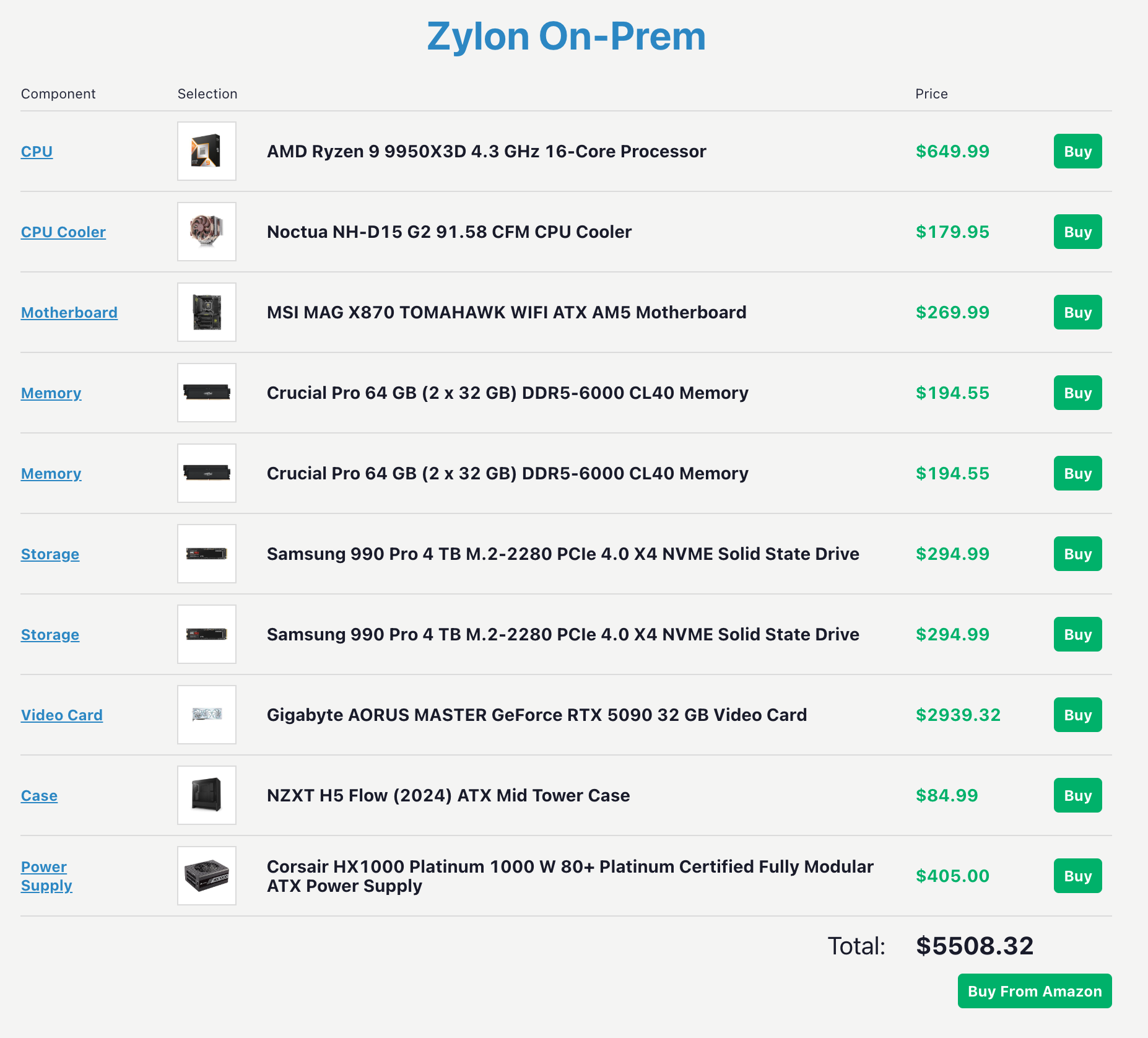
baseline-96g preset tier. In practice, that means using a GPU such as the NVIDIA RTX PRO 6000 (Workstation) (96 GB), an A100 80GB, an H100, or a multi-GPU setup that reaches a similar tier, together with a powerful CPU (16 cores), 128 GB of RAM, enough storage capacity to operate Zylon with margin to grow, a robust cooling solution, and a motherboard sized for the selected GPU layout.
Keep in mind that this is just a recommendation, so feel free to adapt it to your preferences while keeping similar capabilities for ideal performance. We have used Amazon as a provider considering that you can assemble all the parts together by yourself, but any provider that you usually work with should be able to get a similar hardware and assemble it for you.